Two Backends, One VPS, One Caddy: The Docker DNS Collision That Ate Half My API Traffic
For about six days, my product was broken in the most annoying way a product can be broken: it failed the first time you used it, and then it worked.
- Docker
- DevOps
- Networking
- Caddy
- System Design
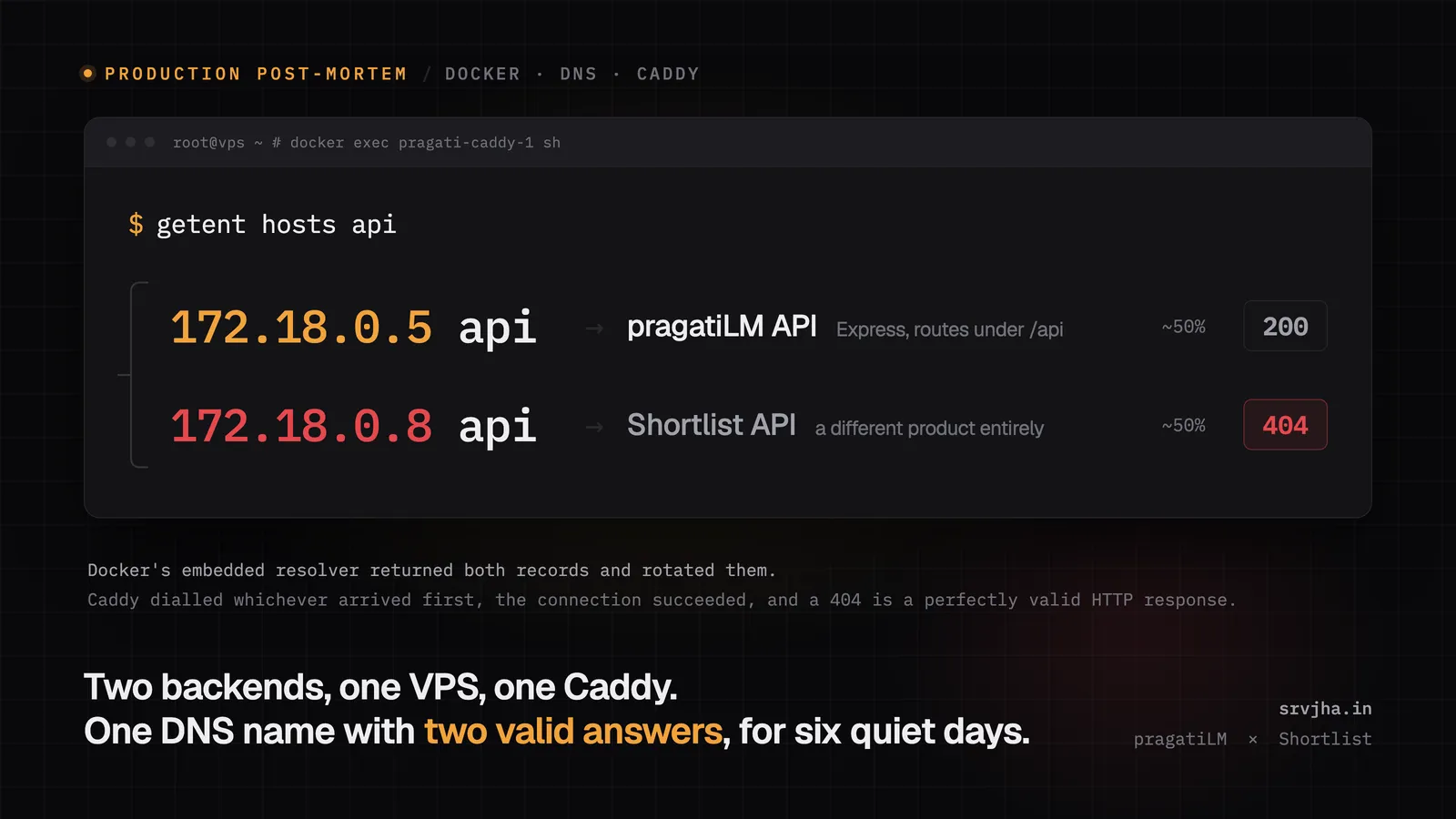
For about six days, my product was broken in the most annoying way a product can be broken: it failed the first time you used it, and then it worked.
You would open pragati.srvjha.in, the page would load, and something on it would fail. An error toast, an empty notebook list, a chat that would not send. You would hit reload, slightly irritated, and everything would be fine. Nothing in the logs looked alarming. The server was not out of memory. The database was healthy. Every monitoring check I had was green.
The cause turned out to have nothing to do with my application code. It was two words in a config file, and a default in Docker that I had never thought carefully about.
This is the full write-up: both tech stacks, the VPS layout, the exact mistake, the reproduction, the fix, and the second outage I caused while fixing the first one. I have included real code and real terminal output throughout, because the whole lesson lives in the details.
Table of what actually happened
- Two products, one box
- The decision that caused it: one shared reverse proxy
- The background you need: how Docker containers find each other
- The mistake, in six lines of YAML
- Why it presented as "fails once, then works"
- Diagnosing it, including the two wrong theories I chased first
- The part that scared me more than the outage
- A minimal reproduction you can run in 60 seconds
- The fix: three networks and one renamed service
- Applying the fix broke the other product
- A bonus trap: editing a bind-mounted file
- Verification
- The checklist I wish I had started with
- Glossary
1. Two products, one box
I run two separate products on one Contabo VPS. They are different codebases, different GitHub repos, different domains, different databases, different users.
Product A: pragatiLM
A NotebookLM-style RAG product. You upload documents, PDFs, YouTube links, and then ask questions and get answers with citations back to the exact source span.
| Layer | What it runs |
|---|---|
| Frontend | Next.js 16.2, React 19.2, hosted on Vercel at pragati.srvjha.in |
| API | Express + TypeScript on Node 22 (node:22-slim), at backend-pragati.srvjha.in |
| Background work | BullMQ worker, same image, different entrypoint |
| Relational DB | Postgres 16, accessed through Drizzle ORM |
| Vector DB | Qdrant 1.18.3 |
| Queue / cache | Redis 7 |
| Models | OpenAI for generation and embeddings, Cohere rerank-v3.5 for reranking |
| Auth | better-auth, session cookies |
Six containers: caddy, api, worker, postgres, redis, qdrant, plus a one-shot migrate container that runs database migrations and exits.
Product B: Shortlist
An AI resume builder. You write or import a resume, tailor it to a job description with an LLM, and it typesets the result into a PDF with LaTeX.
| Layer | What it runs |
|---|---|
| Frontend | TanStack Start (React SSR) on Vercel, functions in Mumbai (bom1) |
| API | Express 5 + TypeScript on Node 24 (node:24-slim), at api.shortlist.co.in |
| Validation / ORM | Zod, Drizzle |
| Relational DB | Postgres 17 |
| PDF typesetting | Tectonic (LaTeX) in a separate sandboxed container |
| Storage | Cloudflare R2 |
| Models | Vercel AI SDK, OpenAI by default |
| Scheduled work | A worker holding a Postgres advisory lock per task (no Redis, no queue) |
Five containers: shortlist-api, worker, compiler, postgres, backup.
Note the shape of both: the frontend is on Vercel, only the API is on the VPS. The browser talks to Vercel for HTML and to the VPS for data. That matters later, because it means every single interaction with either product crosses the VPS boundary through one piece of software.
The VPS
$ nproc
4

$ free -h | head -2
               total        used        free      shared  buff/cache   available
Mem:           7.8Gi       2.0Gi       1.3Gi        36Mi       4.8Gi       5.7Gi

$ . /etc/os-release && echo "$PRETTY_NAME"; uname -r
Ubuntu 24.04.4 LTS
6.8.0-139-generic

$ docker --version; docker compose version
Docker version 29.7.2, build a7dcaa6
Docker Compose version v5.4.0

$ df -h / | tail -1
/dev/sda1        96G   26G   71G  27% /
Four vCPUs, 7.8 GB RAM, 96 GB disk, Ubuntu 24.04. Eleven containers across two Docker Compose projects. This is a perfectly reasonable amount of work for this machine, and resource exhaustion is not the story, although I wasted an hour convinced that it was.
2. The decision that caused it: one shared reverse proxy
Both APIs need HTTPS. Both are addressed by a public hostname. Only one process can bind to port 443.
So you need a reverse proxy: one piece of software that owns 80 and 443, terminates TLS, and routes by Host header to whichever backend the request is for. I use Caddy, mostly because it obtains and renews Let's Encrypt certificates by itself. No certbot, no renewal cron, no expiry date to remember.
pragatiLM was deployed first, so Caddy lives in pragatiLM's Compose project. Here is that part of the Caddyfile, as it was:
# server/Caddyfile
backend-pragati.srvjha.in {
	# The API is not published to the host at all; this name resolves on the
	# compose network.
	reverse_proxy api:4000 {
		# Server-sent events carry the answer as it is generated. Without
		# this, Caddy buffers the response and the whole point of streaming
		# is lost: the reader waits, sees nothing, then gets everything.
		flush_interval -1
	}

	request_body {
		max_size 60MB
	}

	encode gzip
}
Read reverse_proxy api:4000 again, because that line is the bug. Not today, not on its own. It was correct and unambiguous for as long as pragatiLM was the only thing on that machine.
Then Shortlist needed HTTPS too. The options were:
Option 1: give Shortlist its own proxy. Impossible without extra work, because ports 80 and 443 are taken. You would have to move to a two-layer setup, or use different ports, which means ugly URLs like api.shortlist.co.in:8443, which breaks the whole point of a clean public API.
Option 2: share the existing Caddy. Add a second site block for api.shortlist.co.in pointing at Shortlist's API container. One proxy, two certificates, two upstreams. Cheap, standard, and what almost every tutorial on the internet suggests.
I chose option 2, and I still think option 2 is right. A shared edge proxy on a single box is normal and good. The mistake was not sharing the proxy. The mistake was how I let the proxy reach across the boundary between the two projects.
Here is the Caddyfile addition, commit e7bf659, 30 September:
# Shortlist API (a separate compose project that joins this network).
api.shortlist.co.in {
	encode zstd gzip
	reverse_proxy shortlist-api:4000
	header -Server
}
That looks careful. It addresses Shortlist by a specific, unique-sounding name. Hold that thought.
3. The background you need: how Docker containers find each other
To understand what went wrong, you need four facts about Docker networking. If you already know them, skip to section 4, but I would read fact 3 and 4 anyway, because they are the ones that got me.
Fact 1: containers talk over a user-defined bridge network
A Docker network is a virtual switch. Containers attached to the same network get an IP on the same private subnet and can reach each other directly. Containers on different networks cannot, even on the same host.
                   +--------------------------------+
                   |     network: my-network        |
                   |        subnet 172.18.0.0/16    |
                   |                                |
                   |  +---------+     +----------+  |
                   |  |   api   |     | postgres |  |
                   |  |172.18.0.2     |172.18.0.3|  |
                   |  +---------+     +----------+  |
                   +--------------------------------+
This is why a Compose stack works without publishing any ports: api can reach postgres:5432 internally, and nothing outside the box can.
Fact 2: Docker runs a DNS server inside every container
Containers do not hardcode IPs, they use names. Those names resolve because Docker runs an embedded DNS resolver and points every container at it. You can see it:
$ docker exec pragati-caddy-1 cat /etc/resolv.conf
# Generated by Docker Engine.
nameserver 127.0.0.11
search .
options edns0 trust-ad ndots:0
127.0.0.11 is not a real nameserver on the network, it is a loopback address inside the container's network namespace that Docker intercepts. When Caddy resolves api, that query goes to Docker's own resolver, which answers from its internal table of containers and names, and forwards anything it does not know to the host's upstream DNS.
Fact 3: a container has several names, and Compose adds them for you
This is the one that matters. A container is registered in that DNS table under a set of network aliases, and it gets more than one. Here is a live container from my box:
$ docker inspect pragati-api-1 \
    --format '{{json .NetworkSettings.Networks}}' | jq
{
  "caddy-edge": {
    "Aliases": ["pragati-api-1", "api", "pragati-api"],
    "IPAddress": "172.22.0.2"
  },
  "pragati-backend": {
    "Aliases": ["pragati-api-1", "api"],
    "IPAddress": "172.19.0.6"
  }
}
Three names for one container, on each network it joins:
pragati-api-1, the container nameapi, the Compose service name, added automaticallypragati-api, an explicit alias I declared
Compose registers the service name as an alias on every network the service joins. You do not ask for this. You cannot easily turn it off. It is the convenience that makes postgres:5432 work in your connection string, and it is completely invisible until it hurts.
And critically: an explicit aliases: list is additive. It adds names. It does not replace the service name. I will prove that in section 8, because it is the exact detail that defeated a deliberate attempt to avoid this bug.
Fact 4: a name can resolve to more than one container, and Docker will round-robin
Nothing stops two containers from claiming the same alias on the same network. Docker does not error, does not warn, does not log anything. It simply records both, and when something resolves that name it returns both A records, rotating the order.
That is Docker's built-in load balancing. For replicas of the same service it is a feature. For two unrelated applications it is a loaded gun.
And one fact about Compose projects
Compose puts every project on an automatically created network named <project>_default. My pragatiLM compose file starts with:
name: pragatiand originally declared no networks at all. So Compose created pragati_default and attached all six services to it. The datastores, the API, the worker and Caddy, all on one implicit network I had never named or thought about.
4. The mistake, in six lines of YAML
Here is Shortlist's compose file as it was, from commit eef4ab0 on 30 September. Shortlist needed to be reachable by pragatiLM's Caddy, and Caddy was on pragati_default, so Shortlist joined pragati_default:
# Shortlist's docker-compose.prod.yml, the version that caused the incident
name: resumebuilder

networks:
  # The existing reverse proxy's network, e.g. pragati_default. Find it with: docker network ls
  proxy:
    external: true
    name: ${PROXY_NETWORK}        # .env.production: PROXY_NETWORK=pragati_default
  edge: {}
  backend: { internal: true }
  compile: { internal: true }

services:
  api:                            # <-- the service is called "api"
    networks:
      edge: {}
      backend: {}
      compile: {}
      # Shared with the Caddy that already serves ports 80/443 on the VPS; the alias avoids
      # clashing with other apps' services on that network.
      proxy:
        aliases: [shortlist-api]
I want to draw your attention to that comment, because I did not write it and I find it genuinely humbling:
the alias avoids clashing with other apps' services on that network
The intent is exactly right. The author saw the risk, named it correctly, and took the obvious precaution. An explicit, unique alias, shortlist-api, so Caddy could address the container by a name nothing else could claim. The Caddyfile does address it that way, and that half worked perfectly: shortlist-api only ever had one claimant, and Shortlist's traffic always reached Shortlist.
But the precaution did not do the thing the comment says it does, because of Fact 3. The alias was added, not substituted. Declaring aliases: [shortlist-api] gave the container a new name and took nothing away, so Compose still registered the service name api on that same shared network, exactly as it does on every other network.
This is the sort of bug I find most interesting: not an oversight, but a correct instinct, acted on, and defeated by a default. The comment is a precise description of a guarantee the code does not provide.
Meanwhile, pragatiLM's own API is a Compose service called api, on the same network, so it also registered api.
Two different applications. One shared network. Both claiming the DNS name api. And pragatiLM's Caddyfile said:
reverse_proxy api:4000Both containers listen on port 4000. Both accept the TCP connection. Both speak HTTP.
                        pragati_default
   +-------------------------------------------------------------+
   |                                                             |
   |   +----------+                                              |
   |   |  Caddy   |   "who is api?"                              |
   |   |          |-------------+                                |
   |   +----------+             |                                |
   |                            v                                |
   |                   +-----------------+                       |
   |                   | Docker DNS      |                       |
   |                   |   127.0.0.11    |                       |
   |                   +-----------------+                       |
   |                     |             |                         |
   |         api ->  172.18.0.5   172.18.0.8  <- api             |
   |                     |             |                         |
   |                     v             v                         |
   |         +-------------------+  +----------------------+      |
   |         | pragati-api-1     |  | resumebuilder-api-1  |      |
   |         | Express, routes   |  | Express, routes      |      |
   |         |   under /api/*    |  |   under /v1/*        |      |
   |         | :4000             |  | :4000                |      |
   |         +-------------------+  +----------------------+      |
   |                                                             |
   |   also here, with no passwords:                             |
   |   postgres   redis   qdrant   worker                        |
   +-------------------------------------------------------------+
Every request to backend-pragati.srvjha.in was a coin flip between my application and somebody else's.
What the wrong half did
Shortlist's routes live under /v1. pragatiLM's live under /api. So when a pragatiLM request landed in Shortlist's Express app, no route matched, and it fell through to Shortlist's catch-all 404 handler:
// Shortlist: backend/src/middleware/not-found.ts, mounted after all routes
res.status(404).json({
  error: {
    code: "NOT_FOUND",
    message: `No route for ${req.method} ${req.path}`,
  },
});
A clean, well-formed, entirely correct 404, from an application that had never heard of my product.
5. Why it presented as "fails once, then works"
This is the part that kept me from finding it for six days, so it is worth being precise about.
The failure is invisible to every layer that could have caught it
Think about what Caddy experienced. It resolved a hostname and got an address. It opened a TCP connection, which succeeded. It sent an HTTP request and got a complete HTTP response back with a valid status line, valid headers and a JSON body.
From the proxy's point of view, nothing failed. A 404 is a successful HTTP transaction with a disappointing status code. So:
- Caddy had no reason to retry. Its upstream failover triggers on transport errors, like a refused connection or a timeout. There was no transport error.
- My health checks passed, because Docker health checks run inside the container against
localhost, never through DNS or the proxy. - The GitHub Actions deploy gate passed, because it polls
/api/healtha handful of times and takes the first success as proof of life. A coin flip that comes up heads once looks exactly like a healthy deploy. - Nothing appeared in pragatiLM's application logs, because the requests never reached pragatiLM. The logs were not full of errors. They were missing entries, which is a much harder thing to notice.
Half my traffic was being silently answered by a stranger, and every instrument I owned reported that the system was fine.
Why "reload fixes it" rather than "every other click fails"
If resolution is 50/50, why did it feel like one bad page load followed by a good one, instead of steady alternating failure?
Because the coin flip happens per connection, not per request. Caddy's HTTP transport is Go's, and Go pools and reuses keep-alive connections, keyed by the upstream host string. The DNS lookup happens when a new connection is dialled. Once a connection to one of those two IPs is in the pool, subsequent requests ride that same connection to that same backend until it goes idle and is closed.
So failures arrive in clumps. A page load that opens a fresh connection to the wrong container fails broadly and visibly. Hit reload, more connections get opened, and the odds that the one visible request you are watching lands correctly are decent. Add the fact that the human brain treats "it worked after a retry" as "transient glitch, not my problem", and you have a bug that can live for six days.
Measured at the DNS layer, over many fresh lookups, it really is about half. Measured as a user, it is "pragati is a bit flaky on first load."
6. Diagnosing it, including the two wrong theories I chased first
Wrong theory 1: the box is out of resources
My first instinct was that running two full stacks plus a LaTeX compiler on four vCPUs was simply too much, and that something was being starved on cold start. This is a very comfortable theory because it requires no thinking.
I measured it instead of believing it:
$ free -h
               total        used        free      shared  buff/cache   available
Mem:           7.8Gi       2.0Gi       1.3Gi        36Mi       4.8Gi       5.7Gi

$ cat /proc/meminfo | grep -i swap
SwapTotal:             0 kB
SwapFree:              0 kB

$ uptime
 load average: 0.29, 0.31, 0.35
5.7 GB available of 7.8. Zero swap used, so nothing had ever been paged out. Load average 0.29 on four cores, which is 7% utilisation. The box was close to idle. Theory dead, and the time was not wasted, because ruling it out is what forced me to look at the request path instead of the machine.
Wrong theory 2: cold start somewhere in the stack
"First request slow or failing, subsequent ones fine" is the signature of a cold start. Vercel functions cold starting, a connection pool filling, a model client initialising lazily. I spent a while here. What killed it was timing: the failures were not slow. They were instant. A cold start makes you wait. This did not make you wait, it just returned the wrong thing immediately.
The thing that actually cracked it
I stopped guessing and read the response body of a failing request:
{"error":{"code":"NOT_FOUND","message":"No route for GET /api/health"}}pragatiLM does not produce that. pragatiLM's 404 says "Route not found", a different shape entirely, with a different envelope.
That JSON was a fingerprint. It was proof, not inference, that another application was answering requests sent to my hostname. The question changed from "why is my API failing" to "why is my API not the thing being asked", which is a much more tractable question.
Then I asked Docker's resolver directly, from inside Caddy, twice:
$ docker exec pragati-caddy-1 getent hosts api
172.18.0.8      api

$ docker exec pragati-caddy-1 getent hosts api
172.18.0.5      api
Two lookups of the same name, one second apart, two different addresses. One of those containers was mine. The other was not.
$ docker network inspect pragati_default \
    --format '{{range .Containers}}{{.Name}} {{end}}'
pragati-api-1 pragati-worker-1 pragati-caddy-1 pragati-postgres-1
pragati-redis-1 pragati-qdrant-1 resumebuilder-api-1
There it was in the last field. resumebuilder-api-1, sitting on pragatiLM's private network, holding a claim on the name api.
7. The part that scared me more than the outage
Go back and look at that network inspect output, and notice what else is on pragati_default:
pragati-postgres-1 pragati-redis-1 pragati-qdrant-1Those three have no authentication worth the name. Postgres has a password, but Redis 7 and Qdrant as I run them have no password at all. That was a deliberate, documented decision, and it is written into the compose file:
# Production. The difference from docker-compose.yml is not the images, it is
# what is reachable: development publishes Postgres, Redis and Qdrant to the
# host because that is convenient on a laptop. On a public address it would
# mean an open database. Redis and Qdrant have no password at all, and the
# internet finds an open one within hours.
#
# So here only Caddy publishes ports. Everything else talks over the private
# network below, by service name, and cannot be reached from outside the box.
The entire security model was "nothing foreign is on this network." That is a reasonable model. It is how most people run a single-box Compose stack, and it is fine right up until the sentence stops being true.
For six days, another application's container, with its own LLM integrations, its own file uploads, its own untrusted LaTeX compiler one network hop away, could open a TCP connection to redis:6379 or qdrant:6333 and do absolutely anything.
Nothing bad happened. Both products are mine, both were written carefully, and there was no attacker. But the broken API was the symptom I noticed, and this was the actual severity. The visible bug was a routing annoyance. The invisible bug was that my blast radius had quietly grown to include a second application's entire dependency tree, and I found out by accident while chasing something else.
If you take one thing from this post, take that. A shared Docker network is not a convenience, it is a trust boundary, and joining one is a security decision.
8. A minimal reproduction you can run in 60 seconds
I do not want you to take any of this on faith, and I did not want to take it on faith either. Here is the whole bug, isolated, on a throwaway network.
Part A: two containers, one name
docker network create demo-collision

docker run -d --name demo-a --network demo-collision \
  --network-alias api alpine:3 sleep 600
docker run -d --name demo-b --network demo-collision \
  --network-alias api alpine:3 sleep 600
No error, no warning. Both containers now answer to api. Their addresses:
demo-a   172.18.0.2
demo-b   172.18.0.3
Now resolve the name once, and look at every record that comes back:
docker run --rm --network demo-collision alpine:3 getent ahostsv4 api172.18.0.2 STREAM api
172.18.0.2 DGRAM api
172.18.0.3 STREAM api
172.18.0.3 DGRAM apiTwo A records for one name. Any client that takes the first answer and dials it is now playing a game of chance. Ten sequential lookups, counting which address came back first:
docker run --rm --network demo-collision alpine:3 sh -c \
  'for i in $(seq 1 10); do getent ahostsv4 api | head -1 | cut -d" " -f1; done' \
  | sort | uniq -c
6 172.18.0.2
4 172.18.0.3Six and four. There is my "roughly half of all traffic", measured rather than assumed.
Part B: proving that an explicit alias does not save you
This is the bit that defeated Shortlist's careful attempt to avoid the clash. Bring up a Compose service named api that declares a different, unique alias, and see what names it ends up with:
# docker-compose.yml
name: demo
networks:
  demo-collision:
    external: true
services:
  api:
    image: alpine:3
    command: sleep 600
    networks:
      demo-collision:
        aliases: [my-unique-name]
docker compose up -d
docker inspect demo-api-1 \
--format '{{(index .NetworkSettings.Networks "demo-collision").Aliases}}'[demo-api-1 api my-unique-name]There it is. I asked for my-unique-name. I got my-unique-name, and api, and the container name. And so:
docker run --rm --network demo-collision alpine:3 getent ahostsv4 api | grep STREAM172.18.0.4 STREAM api
172.18.0.2 STREAM api
172.18.0.3 STREAM apiThree claimants on one name. The explicit alias added a name and removed nothing.
# clean up
docker compose down
docker rm -f demo-a demo-b
docker network rm demo-collision
The lesson, stated plainly: declaring a unique alias is not sufficient. The service name itself must be unique on any network you share with another project. This is the single most important sentence in this post, and it is the opposite of what both of us assumed.
9. The fix: three networks and one renamed service
The fix has three parts, and only one of them actually fixes the bug. The other two make the bug impossible to reintroduce, which is a different and more valuable property.
Target architecture
                         the internet
                              |
                      :80, :443 (only ports published on the box)
                              |
              +-------------------------------+
              |         pragati-caddy         |
              |   TLS, routes by Host header  |
              +-------------------------------+
                              |
   ===================== caddy-edge ==========================
   =  the shared doorway. external, owned by neither project =
   =                                                         =
   =    pragati-api  (alias)          shortlist-api (service) =
   =         |                                |              =
   ==========|================================|===============
             |                                |
   ==========|=========     ==================|===============
   = pragati-backend =      =        shortlist-backend       =
   =    (private)    =      =           (private)            =
   =                 =      =                                =
   =  postgres       =      =   postgres                     =
   =  redis          =      =   worker                       =
   =  qdrant         =      =   backup                       =
   =  worker         =      ==================================
   ===================
                              Shortlist also keeps:
                              resumebuilder_edge    (outbound internet)
                              resumebuilder_compile (internal, api + LaTeX
                                                     sandbox, no internet,
                                                     no database route)
Three ideas in that picture:
caddy-edgeis external, created outside both Compose projects withdocker network create caddy-edge, so neither project owns it, and neither project'sdocker compose downcan delete it out from under the other.- Only the proxy and the things it proxies to are on the edge. Nothing else.
- Each product's datastores are on a private network of their own, and the other product cannot route to them at all.
The compose change
# server/docker-compose.prod.yml
name: pragati

# Two networks, deliberately.
#
# pragati-backend is private: the datastores have no passwords, and the design
# assumes nothing foreign can reach them. That assumption was quietly broken
# when another product's api container was attached to this project's default
# network, which also collided on the DNS name "api" and sent roughly half of
# this API's traffic into the wrong application.
#
# caddy-edge is the shared doorway, created outside both projects so neither
# owns it. Only Caddy and the things it proxies to belong on it.
networks:
  pragati-backend:
    name: pragati-backend
  caddy-edge:
    external: true

services:
  caddy:
    networks: [caddy-edge]
    # ...

  api:
    networks:
      pragati-backend:
      caddy-edge:
        # An explicit alias, so Caddy never has to address this by its
        # service name, which any other stack on the edge could also claim.
        aliases: [pragati-api]
    # ...

  postgres:
    networks: [pragati-backend]
  redis:
    networks: [pragati-backend]
  qdrant:
    networks: [pragati-backend]
  migrate:
    networks: [pragati-backend]
  worker:
    networks: [pragati-backend]
Note what the worker does not get: it has no business being reachable from the edge, so it is not on it. Note also that Caddy is only on the edge now. It does not need to see Postgres and never did.
The name: pragati-backend key is there on purpose. Without it, Compose would call the network pragati_pragati-backend, because it prefixes project names. Naming it explicitly keeps the thing on the server called what the file calls it, which matters a great deal at 2am.
The Caddyfile change
 backend-pragati.srvjha.in {
-	reverse_proxy api:4000 {
+	reverse_proxy pragati-api:4000 {
 		flush_interval -1
 	}
Two words. That is the whole user-visible fix.
And the change on Shortlist's side, which is the one that counts
Shortlist renamed the service itself:
 services:
-  api:
+  shortlist-api:
and dropped pragati_default entirely, moving to caddy-edge plus its own shortlist-backend.
Why does this matter more than everything above? Because of something you can see on my box right now:
$ docker inspect pragati-api-1 --format '{{json .NetworkSettings.Networks}}' | jq '."caddy-edge".Aliases'
["pragati-api-1", "api", "pragati-api"]
My API still registers the name api on the shared edge network. It always will, because Compose always adds the service name, and my service is called api. Splitting the networks did not remove that claim, it just moved it to a different network.
So if Shortlist had moved onto caddy-edge while still having a service called api, the collision would have followed us onto the new network and I would have fixed nothing. The thing that actually resolves the bug is that there is now exactly one container on caddy-edge claiming api. The thing that makes it stay fixed is that my Caddyfile no longer asks for api, so even a future collision on that name cannot misroute my traffic.
Separation is defence in depth. Name uniqueness is the fix. Addressing by an alias you control is the insurance. You want all three.
10. Applying the fix broke the other product
Now the part of the story that most write-ups leave out, because it is embarrassing. Shortlist deployed their half first, through their normal GitHub Actions pipeline, which runs:
docker compose -f docker-compose.prod.yml up -d --build --remove-orphansAnd it failed:
Error response from daemon: failed to set up container networking:
could not find a network matching network mode resumebuilder_backend:
network resumebuilder_backend not found
Here is the sequence, from their deploy log (UTC):
08:03:01  created network shortlist-backend                        <- new network
08:03:03  stopped + removed the old api container
          created resumebuilder-shortlist-api-1                    <- renamed service
08:03:11  removed network resumebuilder_backend                     <- old network GONE
08:03:12  tried to START the existing postgres container
          FAILED: could not find a network matching network mode
                  resumebuilder_backend
          deploy aborted
Read 08:03:11 and 08:03:12 together, because that pair is the whole trap.
docker compose up -d recreates containers whose definition or image changed, and merely starts the ones it thinks are unchanged. Postgres's own service definition had not changed in a way Compose considered material, so Compose chose to start the existing container rather than build a new one. But that existing container was created with a network mode pointing at resumebuilder_backend. A container's network attachment is fixed at creation time. Compose had just deleted that network one second earlier. So the container could not start, and because it could not start, the API that depends on it could not serve, and api.shortlist.co.in returned 502 through Caddy for about a minute.
Recovery was two commands:
docker compose -f docker-compose.prod.yml up -d --force-recreate --no-build postgres
docker compose -f docker-compose.prod.yml up -d --force-recreate worker backup
--force-recreate throws away the existing container and builds a new one from the current definition, which is the only way to move a running container onto a renamed network. Their Postgres data lives in a named volume, so nothing was lost.
The rule: renaming a Docker network is not a config change, it is a recreate. up -d is not sufficient and will leave you with a stranded container and a confusing error that names a network you deliberately deleted.
I got this warning before I applied pragatiLM's half, which is the single luckiest thing about this whole incident, because on my side it would not have been one Postgres container. postgres, redis and qdrant would all have been stranded simultaneously, and the API depends on all three.
So I applied mine by hand, deliberately:
docker compose -f docker-compose.prod.yml up -d --force-recreate Container pragati-postgres-1 Started
Container pragati-postgres-1 Healthy
Container pragati-migrate-1 Started
Container pragati-qdrant-1 Healthy
Container pragati-redis-1 Healthy
Container pragati-migrate-1 Exited
Container pragati-worker-1 Started
Container pragati-api-1 Started
Container pragati-caddy-1 StartedAbout ten seconds of downtime, in a known window, with me watching each datastore come back.
I also committed the compose change with [skip ci] so that the pipeline would not fire a plain up -d at it, and then went and fixed the pipeline itself:
-            docker compose -f docker-compose.prod.yml up -d --build
+            # --force-recreate because without it compose only recreates
+            # containers whose image changed, and leaves the rest running on
+            # whatever they were started with. That is wrong whenever the
+            # compose file itself changed: a renamed network is created, the old
+            # one deleted, and the untouched datastore containers keep
+            # referencing a network that no longer exists.
+            docker compose -f docker-compose.prod.yml up -d --build --force-recreate
The cost is that every deploy now restarts Postgres, Redis and Qdrant rather than just the API and worker, which adds a few seconds to the window where users see 502s. That is a real cost and I thought about it. It is worth paying, because the failure it prevents is a deploy that cannot come back up at all, and because the forced recreate measured at ten seconds in practice.
11. A bonus trap: editing a bind-mounted file
One more thing bit me mid-incident, and it is a classic, so it belongs here.
While testing the Caddyfile fix I edited the file on the host with sed -i. The Caddyfile is bind-mounted into the container as a single file:
volumes:
  - ./Caddyfile:/etc/caddy/Caddyfile:ro
Then I reloaded Caddy:
docker exec pragati-caddy-1 caddy reload --config /etc/caddy/CaddyfileIt reported success. Nothing changed. I reloaded again. Success again. Nothing changed again.
The reason is that a single-file bind mount binds an inode, not a path. sed -i does not edit in place despite the flag name: it writes a new file and renames it over the old one, which creates a new inode. The host directory entry now points at the new inode. The container's mount still points at the old one. So the container was reading the original file, perfectly happily, and caddy reload was honestly reporting that it had successfully loaded a config that had not changed.
Provable in one line:
$ md5sum Caddyfile
$ docker exec pragati-caddy-1 md5sum /etc/caddy/Caddyfile
# different
A reload cannot fix this. Only recreating or restarting the container re-establishes the mount against the current inode. This is why "I changed the config and reloaded and nothing happened" is so often not a config syntax problem.
Two ways out: mount the directory rather than the file, or accept that config changes to a single-file mount require a container restart. I took the second, since it is one line in a deploy script.
12. Verification
I do not consider something fixed because a command exited zero. Here is what I actually checked, in dependency order.
One address per name, from inside the proxy. This is the direct refutation of the bug:
$ docker exec pragati-caddy-1 getent hosts pragati-api
172.22.0.2      pragati-api

$ docker exec pragati-caddy-1 getent hosts shortlist-api
172.22.0.3      shortlist-api
One record each, repeatedly. Before the fix, api returned two.
Network membership is what the file says:
pragati-backend: pragati-api-1 pragati-redis-1 pragati-qdrant-1 pragati-worker-1 pragati-postgres-1
caddy-edge:      pragati-api-1 pragati-caddy-1 resumebuilder-shortlist-api-1
pragati_default: (empty, then deleted)
No datastore is on the edge. No foreign container is on pragati-backend.
The application's own deep health check, which reports 503 if any dependency is unreachable:
{"data":{"status":"ok","uptimeSec":23,
  "services":{"postgres":{"ok":true,"latencyMs":2},
              "redis":{"ok":true,"latencyMs":2},
              "qdrant":{"ok":true,"latencyMs":4}},
  "worker":{"alive":true,
            "queues":["chat","ingest","cleanup","roadmap","podcast"]}}}
And then the thing that was actually broken, hammered rather than sampled:
for i in $(seq 1 12); do
  curl -s -o /dev/null -w '%{http_code} ' https://backend-pragati.srvjha.in/api/health
done
200 200 200 200 200 200 200 200 200 200 200 200Twelve for twelve, and twelve more after the subsequent deploy. The reason to send twelve rather than one is the entire point of this bug: a single green check was always going to pass, even while the system was broken half the time. A probabilistic failure needs a probabilistic test. If you have an intermittent bug and your verification is one request, you have not verified anything, you have drawn one card.
Both products are live. Shortlist is still served by the same shared Caddy, which was never the problem.
13. The checklist I wish I had started with
If you are running more than one project on one box behind one proxy, these are the rules I would now follow without debate.
1. Never put a second project on another project's _default network. It is the path of least resistance and it is wrong. Create a purpose-built external network for the edge:
docker network create caddy-edgeand declare it external: true in both projects. Then neither project's lifecycle commands can affect the other's connectivity.
2. Make every service name globally unique across every project that will ever share a network. Not the alias. The service name, because Compose registers it whether you want it to or not. api is the worst possible name for a service on a shared host, and both of us used it. Prefix by product: pragati-api, shortlist-api.
3. Never address a cross-project upstream by a service name. Use an alias you declared, and name it after the product. If my Caddyfile had said pragati-api from day one, this incident could not have happened no matter what Shortlist did.
4. Put datastores on a private network that the edge cannot reach. If your Redis has no password because "it is only on the internal network", then you have made the network membership list a security control, and you must treat changes to it as security changes.
5. Audit who is on your networks, and make it a habit. One command:
for n in $(docker network ls --format '{{.Name}}'); do
  printf '%-24s %s\n' "$n" \
    "$(docker network inspect "$n" --format '{{range .Containers}}{{.Name}} {{end}}')"
done
If a name in a row surprises you, stop and read the row.
6. Check for duplicate aliases before you ship a shared network. This finds a collision in advance instead of in production:
docker network inspect caddy-edge \
  --format '{{range .Containers}}{{.Name}}: {{.IPv4Address}}{{"\n"}}{{end}}'

# and per container, the names it actually claims:
docker inspect <container> --format '{{json .NetworkSettings.Networks}}' | jq
7. Renaming a network means --force-recreate. Plain up -d will strand containers it decided not to recreate, and the error will name a network you deleted on purpose.
8. Single-file bind mounts need a container restart, not a reload. Or mount the directory.
9. Test intermittent things with volume. Twelve requests, not one. And make your deploy health gate require several consecutive successes, not the first success. Mine still takes the first success, and I now consider that a bug.
10. When a bug is "flaky", find a fingerprint. The thing that cracked this was a 404 body in a JSON envelope my application does not produce. Not a theory, not a hunch: a unique string that could only have come from one place. Guessing about intermittent failures is nearly free and nearly useless. Look for the artefact that could only have one origin.
14. Glossary
Terms used above, defined properly, because half of debugging is knowing what the thing is called.
Reverse proxy. A server that accepts client requests and forwards them to one of several backend servers, usually terminating TLS and routing on hostname or path. Caddy, nginx, Traefik, HAProxy.
Virtual host / Host-based routing. How one proxy on one IP and one port serves many domains: it reads the Host header (or TLS SNI) and picks the backend from it.
Upstream. The backend a proxy forwards to. reverse_proxy pragati-api:4000 declares an upstream.
Bridge network (user-defined). Docker's default network driver for single-host container networking. A virtual switch with its own subnet. Containers on the same user-defined bridge can resolve each other by name; on the legacy default bridge they cannot.
Embedded DNS resolver. The DNS server Docker runs for user-defined networks, reachable at 127.0.0.11 inside each container, which resolves container names and aliases and forwards everything else upstream.
Network alias. A DNS name a container answers to on a given network. A container typically has several: its container name, its Compose service name (added automatically), and any you declare under aliases:. Additive, never replacing.
DNS round-robin. Returning multiple A records for one name and rotating their order, so that clients which take the first answer spread across the set. Docker's built-in load balancing, and the mechanism of this entire incident.
Service discovery. The general problem of how one component finds another's address at runtime without hardcoding it. Docker's DNS is a service discovery implementation, and like all of them it is only as good as the uniqueness of its keys.
<project>_default. The network Compose creates and attaches every service to when you declare no networks. Named from the project name, which comes from the name: key, or the directory name if you omit it.
external: true. Tells Compose a network already exists and is managed elsewhere. Compose will attach to it and will not create or delete it. The correct way to share a network between projects.
internal: true. A network with no outbound route to the internet. Useful for a sandbox, like Shortlist's LaTeX compiler, which should be able to reach the API and nothing else.
Blast radius. How much of a system a single compromise or failure can reach. Joining a network expands it. This is the real reason to care about network separation.
Trust boundary. A line across which you stop assuming good behaviour and start verifying it. A shared Docker network is a trust boundary whether you treat it as one or not.
Bind mount. Mounting a host path into a container. A single-file bind mount attaches the file's inode, which is why replacing the file on the host (as sed -i, most editors, and mv all do) does not change what the container sees.
--force-recreate. Tells Compose to destroy and rebuild containers even when it believes they are up to date. Required when a container's immutable creation-time properties, like network attachment, need to change.
Idempotent, as applied to up -d. It is not. up -d converges toward the file, but only by the diffs it chooses to notice, and network renames are in the gap.
Closing
The whole bug was that two engineers, working on two different products, both called their main service api, and one shared network put those two names in the same room.
Not a Docker bug. Every behaviour involved is documented and sensible on its own. Compose adding the service name as an alias is what makes postgres:5432 work. DNS returning multiple records and rotating them is what makes replica load balancing work. Both features, composed by accident, produced a product that failed half the time and told nobody.
That is the shape of most real production incidents I have hit. Not one dramatic mistake, but two reasonable defaults meeting at an angle nobody looked at, and the only thing standing between you and six quiet days of broken is whether you thought to ask which container a name actually points to.
# the one command I will now run every time I add a service to a shared network
docker exec <proxy-container> getent ahostsv4 <upstream-name>
One line of output is healthy. Two is an outage you have not noticed yet.