Complete Guide on Working of Internet
Have you ever wondered what happens in the background when you send a WhatsApp message to your friend? 🤔📱How does it happen so easily that we don’t even notice the number of things happening in milliseconds during the transfer of data? 🌐⚡ If you’r...
- internet
- ChaiCode
- http
- https
- dns
- Browsers
- data
Have you ever wondered what happens in the background when you send a WhatsApp message to your friend? 🤔📱
How does it happen so easily that we don’t even notice the number of things happening in milliseconds during the transfer of data? 🌐⚡ If you’re thinking about all this, you’re absolutely in the right place! 🛤️✨
Let’s explore this in this article. 🚀💡
This guide is for absolute beginners, so don’t worry if you don’t have any prior knowledge—we’ve got you covered. 🙌📘
What is Internet? 🌐
Before we jump into the internet, let’s first understand what a network is and how it’s related to the internet. 🤝
A network is basically a collection of devices (like computers, routers, etc.) connected to each other to share information or resources. 🖥️📡 You can think of a computer network like your cohort group in Discord 🧑🤝🧑💬, where everyone shares and accesses each other's blogs.
The internet, on the other hand, is a vast collection of networks connected to each other. 🌍✨ In fact, the word "internet" comes from the concept of interconnected networks. 🔗
Working of Internet
Now that we understand the basic concept of the internet, let’s dive deeper into how these connections actually work. 🌐🔍
When I mentioned the connection of devices, you might wonder what happens under the hood of this connection.💻 Let’s break it down step by step: 🛠️👇
Physical Connections
Computer connect with each other via :
Wires and Cables:
-
Ethernet cables are used for smaller nearby distances that connects devices directly to network for fast and stable connection.
-
Fiber-optic cables are used for longer distances that transmits data as light signals, enabling high-speed data transfer.

Radio Waves:
-
Wi-Fi: A wireless technology that allows devices to connect to the internet within a certain range using radio waves.
-
Cellular Networks: Mobile data connects devices through 4G/5G networks, using radio waves to communicate with cell towers.
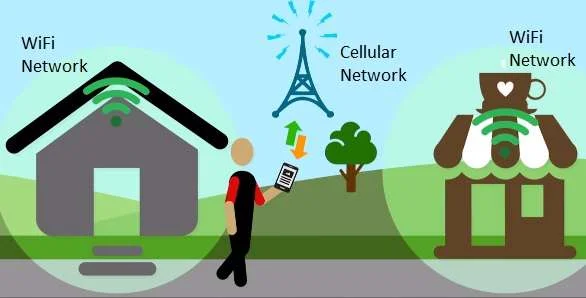
These connections form the foundation of how devices communicate with each other.🤝
Now we will understand the flow of how the internet works. 🌐➡️📶
Internet Protocols 🖧
Every device on the internet communicates using a set of rules called protocols:
-
TCP/IP (Transmission Control Protocol/Internet Protocol):
-
Ensures reliability during the transfer of data packets. ✅
-
Splits data into small packets for transmission. 📦
-
-
HTTP/HTTPS (HyperText Transfer Protocol):
-
Used for browsing websites. 🌐
-
HTTPS adds encryption for secure communication. 🔒
-
🔗 Learn more about protocols here: GeeksforGeeks - Types of Internet Protocols
Addresses and Domain Names 🏷️
Each device is assigned a unique identifier known as an IP address (like 192.168.0.1). To make it easier for humans to access resources:
-
Domain Names (e.g.,
www.google.com) act as the contact list app in your phone. 📞 -
DNS (Domain Name System) converts these names into IP addresses so devices know where to send requests. 🔄
Routing Data 🚀
Once the connection is established:
-
The browser knows the address to send the data. It prepares the data along with metadata (extra information) and divides it into packets. ✂️📦
-
Packets are routed via multiple devices like:
-
Routers: Direct packets between networks, ensuring they follow the optimal path. 🛣️
-
Switches: Manage packet transfer within a local network. 🔀
-
-
Packets might pass through undersea cables, satellites, or multiple networks to reach their destination. 🌊🛰️
Servers and Data Processing 💾
When packets reach their destination:
-
Servers (powerful computers) process the request. For example:
-
A web server retrieves and sends a webpage. 🌐📤
-
A database server fetches or updates data. 📊
-
-
The server then sends the response back as packets. 📨
Receiving and Rendering Data 📥
The packets travel back to your device via the same or a different path:
-
Your device reassembles the packets into their original form. 🛠️
-
Applications (e.g., a browser or video player) interpret the data:
-
A web browser renders HTML, CSS, and JavaScript into a viewable webpage. 🖥️📄
-
A video player streams the video content. 🎥📺
-
Bonus Info 🎁
-
Real-Time Communication:
For activities like video streaming or online gaming:- Data is sent and received continuously in real-time using protocols like UDP (User Datagram Protocol), which prioritizes speed over reliability. 🕒⚡
-
Security and Encryption:
To ensure secure communication:-
Encryption (like SSL/TLS) protects sensitive data from interception. 🔐
-
Protocols like HTTPS, VPNs, and firewalls help safeguard information. 🛡️
-
Internet Workflow for Query Search

You must be wondering why the data packets travels to the nearest data centers ?
Google has data centers all over the world to:
-
Reduce Latency:
- A nearby server means the request doesn't have to travel far, making it faster.
-
Load Balancing:
- Google ensures traffic is distributed efficiently across their servers to avoid overloading any one data center.
-
Caching:
- Many Google data centers have cached copies of popular queries and results. If the data you’re requesting is already available at the nearest data center, it can respond immediately, avoiding unnecessary delays.
What Happens at the Nearest Data Center?
-
The nearest data center receives your request and processes it.
- If the result for your query (e.g., "chaicode") is already cached at that data center, it immediately sends back the response.
If it isn’t cached, the data center might:
-
Forward your request to another Google server where the full search index is stored.
-
Or fetch the necessary data from Google’s core infrastructure and send it back to you.
Imagine you’re ordering pizza: 🍕📦
-
You place your order at the nearest branch of a pizza chain (this is the nearest data center*). 🏠📡*
-
If the branch already has the pizza type you want ready (cached), they immediately deliver it to you. 🚴♂️⚡
-
If they don’t have it, they contact the main kitchen (core Google server) to prepare the pizza, then deliver it to you via the local branch*. 🏭➡️🏠🍕
Conclusion
If you have reached here means now you know everything related to the internet how it works its workflow you’re now equipped with internet more effectively. Keep exploring, as the digital world has endless opportunities waiting for you! 🌐🚀
If you liked this article do give it a like and share with your friends❤
Connect with me on 👇
Originally published on Hashnode